كورس بالتفصيل من الصفر وحتي الاحتراف لبرنامج ال Power BI هتتعلم فيه كل شيء عن برنامج ال Power BI
إنضم الي اكثر من 5000 طالب حضرو معنا كورسات ال ICDL & Primavera
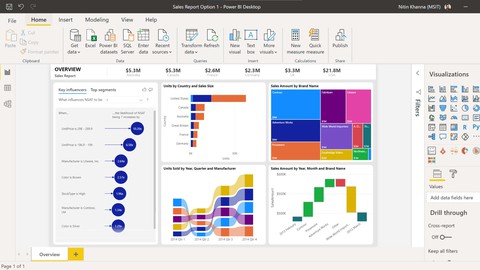
Power BI provides cloud-based BI (business intelligence) services, known as “Power BI Services”, along with a desktop based interface, called “Power BI Desktop”. It offers data warehouse capabilities including data preparation, data discovery and interactive dashboards.
يستخدم برنامج ال Power BI في اظهار رسومات بيانيه توضح لاداره الشركات والادارات بسهوله جدا جميع الاحصائيات المطلوبه والتي تساعد الاداره في اتخاذ قرارات مصيريه للشركه
Course Content :
Introduction
First Video ( Introduction to the course )
( 1 )
– Why We Use Power BI & Power BI Definition
– How to Download & install Power BI
( 2 )
Introduction to basic charts in power BI
– How to create clustered column chart
– stacked column chart
– Pie chart
– Donut chart
– funnel chart
– ribbon chart
– Include & execlude data
– View data & export data
( 3 )
– Maps in Power BI
– creating simple map
– simple field map
– map with pie chart
– formatting maps
– change map background
– Map of egypt
( 4 )
– Tables and Matrix in power BI
– Create table
– Format table
– conditional format for table
– change aggregation in table ( choose sum or averag for columns )
– Creat A matrix in power BI
– conditional format in matrix
– automatic hirearchies in matrix
– show totals & subtotals in matrix
– Number Formatting in Power BI
( 5 )
– Other Charts in Power BI
– Line chart
– Drill down in line chart
– Area Chart
– Line Vs column chart
– Scatter Plot
– Waterfall chart
– Tree Map
– Gauage chart
( 6 )
– Cards and Filters
– Number Card
– Text Card
– Data Card
– Multi-Row Card
– Filter on visual
– Filter on page
– Filter in all pages
– Drill Throw
( 7 )
– Slicers in Power BI
– Silcer for text
– format text slicer
– data slicer
– format date slicer
– number slicer
( 8 )
– Introduction to advanced charts in Power BI
– Animated Bar chart Race
– Drill down Donut chart
– Drill down column chart
– Word cloud
– sankey chart
– infographic
– play axis
– scroller
– sunburst chart
– histogram
( 9 )
– Images – Text – Buttons in Power BI
– Insert image
– Insert Text
– Insert Shapes
– Insert Buttons
– Web URL action
– Page Navigation
– Book Mark action
– Drill Throw action
( 10 )
– Publishing Reports & Connecting With Power BI Services
– How to create power BI report
– How to create acount on power BI Services
– Publish reports to Power BI Services
– Export Power BI to PPT & PDF
– Comment & share & subscribe to Power BI reports
– Create dashboard in power BI services
– Problems & Solutions for Power BI Dashboard
– How to refresh reports automatically on power BI services
( 11 )
– Text Function in power Query
– Merge
– Split & Trim
– Upper , Lower , Proper
– Add suffix & prefix
– Left & right & MID
– Extract text with delimiter
( 12 )
– Date Function in Power Query
– Year , Quarter , Month , Day
– Difference between Dates & earliest , latest
– Name of day , month
– Day of week / month / year
– extract date from date and time
– calculate age in 2 clicks
– which day of year quarter , month your date of birth
( 13 )
– Power Quary ( Number Functions )
–Add , subtract , Divide , Multiply
– Percentage , Percent of , Modulo
– Rounding Number
– IS Even , Is Odd and sign
( 14 )
– Appending Files and tables in power query
– Append multiple CSV Files from a folder
– Append multiple Excel Tables / Sheets from a single folder
– Append Excel Tables with different number of columns
– Append multiple Excel files from afolder
– Append different data source files in power query
( 15 )
– Merge Files & tables in Power Query
– Merge tables / sheets
– merge data from multiple excel files / workbooks
– Merge data from different data source
– merge data having multiple matching columns or different criteria
( 16 )
– What is conditional columns & Columns from Excel
– Column from examples on splitting text
– columns from examples on merge text
– columns from examples ( data columns )
– columns from examples ( alphanumeric data )
– Conditional columns in one column
– Conditional columns in 2 columns
– conditional columns ( comparing 2 columns values )
– Conditional columns on dates
( 17 )
– Very Important Topics in Power Query
– Fill down and Fill up
– Grouping
– Transpose
– Unpivot
– Data types in Power Query
– Replace Errors and values
– Keep Rows & Remove Rows
– Keep Columns & Remove Columns
(18) How to link primavera P6 Database to Power BI
(19) How to create report using Primavera P6 & Power BI .